Local Voice Pack - January 24, 2026
We're happy to introduce Deskie – Local Voice Pack, a new DLC that allows Deskie to speak entirely on your local machine — with zero Moe Points consumption.
Unlike online voice packs that consume Moe Points during conversations, the Local Voice Pack runs offline and is perfect for extended use, background chatter, and always-on desktop companionship.
Getting Started
- Install Deskie – Local Voice Pack
- Open the Settings page
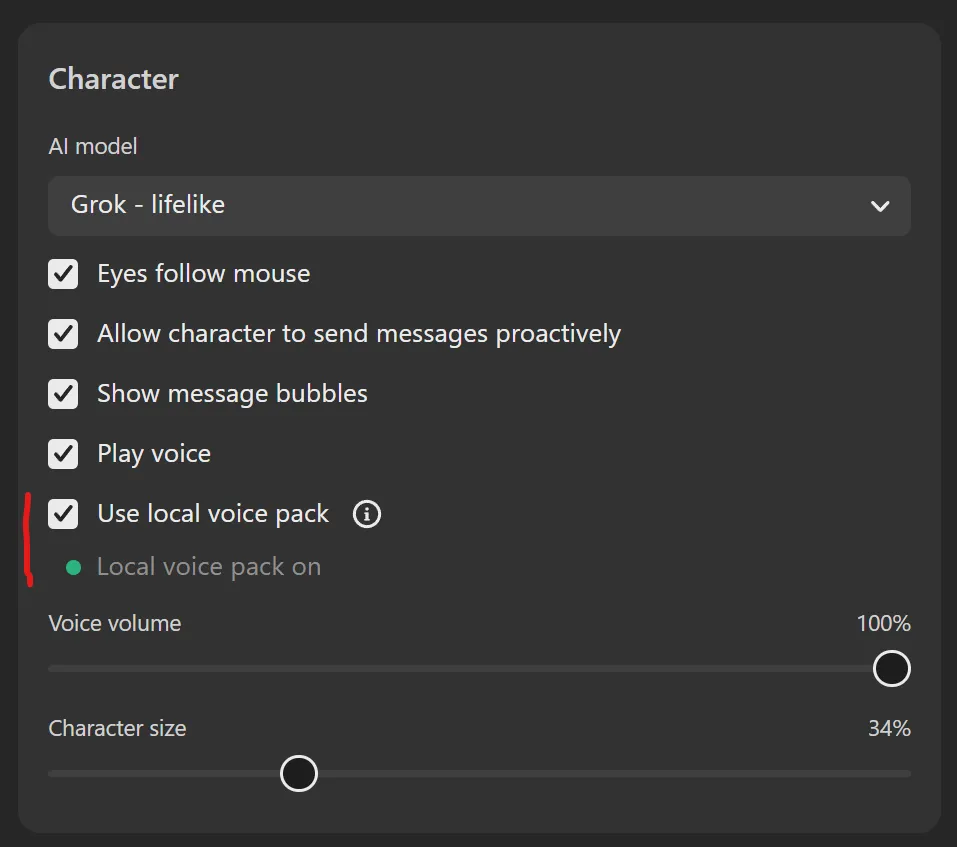
- Under System, enable "Use local voice pack"
The local voice pack may take a moment to start. Once active, the status indicator will turn green and display "Local voice pack on".
You're all set — Deskie will now use local voice synthesis with no Moe Points cost.
Language Support
- English
- Chinese
Notes & Limitations
- Latency, stuttering, or higher CPU usage may occur depending on your hardware
- Performance and voice naturalness vary across different PCs
- This DLC focuses on cost-free usage and offline availability, not maximum audio quality